
Sources
Ordalie's answers are built from a set of legal sources you control. You decide which ones are active — codes, case law, doctrine — and you can add your own documents or websites alongside them.
Ordalie's sources
French legal corpus
Ordalie holds the full official French legal corpus — 102 complete French codes, kept constantly up to date. This base covers every area of law:
- Main codes: Civil Code, Commercial Code, Labour Code, Penal Code, Code of Civil Procedure, Code of Criminal Procedure, and more.
- Specialised codes: Public Health Code, Environmental Code, Urban Planning Code, Intellectual Property Code, and more.
- Non-codified laws and official ordinances published in the Official Journal.
- Case law from the Court of Cassation, the Council of State, the courts of appeal, the administrative courts of appeal, and certain first-instance courts.
- The Official Public Finance Bulletin (BOFiP) for administrative tax guidance.
European law
Ordalie's European corpus draws on EUR-Lex, the official database of European Union law:
- Every European regulation and directive in force, with sharper search to target these texts precisely.
- Case law from the Court of Justice of the European Union (CJEU) and the General Court of the European Union (GCEU).
Choosing your legal sources
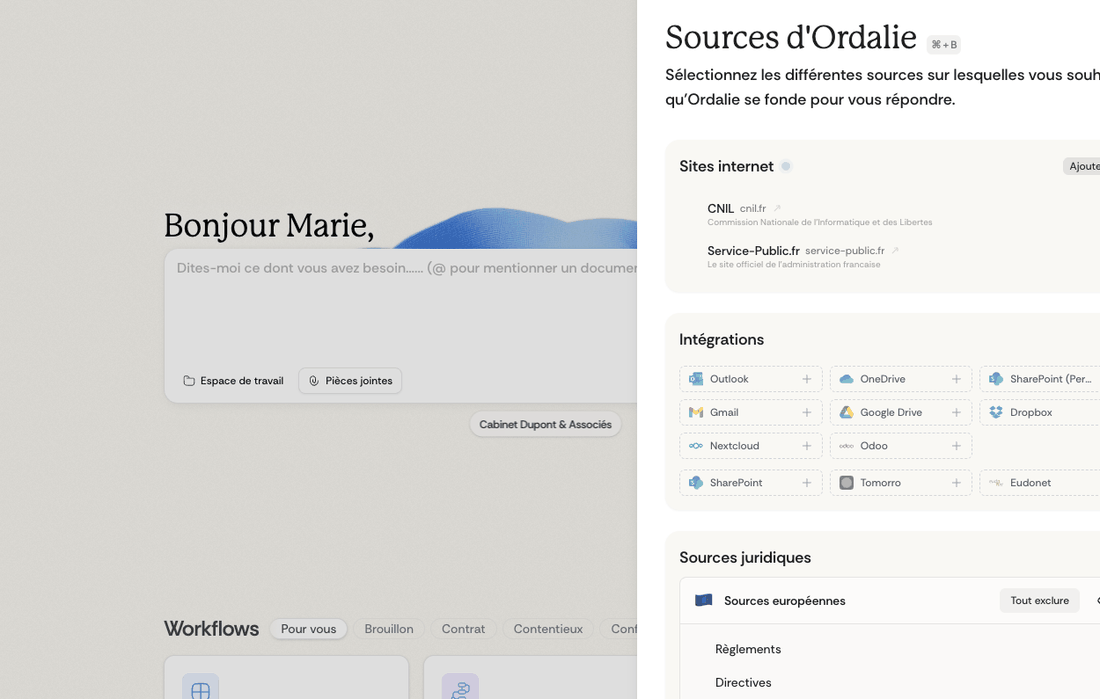
You can tailor which legal sources Ordalie draws on for its analyses from the Sources view in your workspace. Depending on your setup, your search options can also lead to the same scope.
Sources grouped into families
Ordalie's legal sources come in three broad families, and you can switch each one on or off on its own, depending on what you need:
Normative sources: all legislation and regulations — every code (Civil, Commercial, Labour, and the rest), plus non-codified laws, ordinances and decrees published in the Official Journal.
Judicial sources: every court decision. You can narrow this to the jurisdictions that matter to you — Court of Cassation, Council of State, courts of appeal, administrative courts of appeal, or first-instance courts — so your research stays focused on the case law most relevant to your field.
Analytical sources: legal commentary, analysis and doctrine. This family includes the Official Public Finance Bulletin (BOFiP) for tax matters, along with other official doctrine sources.
Fine-tuned to your practice
Beyond these broad families, you can:
- Set aside specific codes that have nothing to do with your practice.
- Filter by jurisdiction to consult only certain courts.
- Focus your results on the legal areas that concern you.
For instance, a business-law specialist can leave out the public health or urban planning codes while keeping the commercial case law of the Court of Cassation close at hand.
Looking up companies
Alongside the usual legal sources, Ordalie can quickly pull official information on French, British and American companies. Just enter a company name or a SIREN number (for France) in your search, and Ordalie retrieves the available public data: legal form, registered office, directors, share capital, and more. It's especially handy when you're reviewing contracts or running due diligence.
Your own sources
Ordalie allows you to enrich its knowledge base with your own sources, creating a tool perfectly adapted to your practice. All your sources remain strictly private and are never accessible to other users. You can also connect external sources via Integrations.
Sources from the web
You can point Ordalie at trusted websites to enrich your research. How many you can add depends on your account:
- Free accounts: up to 2 websites.
- Pro accounts: unlimited websites.
Sites people often add include service-public.fr, conseil-etat.fr, courdecassation.fr, defenseurdesdroits.fr, cnil.fr, or sites that specialise in your own field.
To add one, open your source settings and add it under internet sources. You can turn each site on or off on its own, whenever you need.
How it works: Ordalie reads through these sites and makes their content searchable. When you research, the relevant passages flow into your answers, with precise references back to the original pages.
💡 Need a source that's not yet available? We regularly expand our legal source database. If you need a specific source, reach out to us at [email protected] — we review every request.
Sources in your answers
Citations spotted automatically
As your answers are written, Ordalie watches for legal references in real time, then identifies and formats them on its own:
- References to code articles.
- Case law citations.
- Mentions of regulatory texts.
- References to your own source documents.
The sources behind each answer
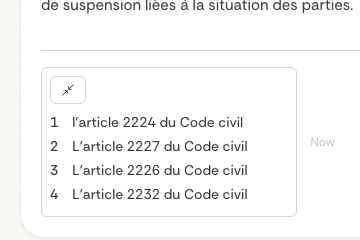
Every answer Ordalie gives comes with its sources laid out alongside:
- The cited sources, with direct links to the original texts.
- The relevant excerpts from the documents used to build the answer.
- Precise references — articles, judgment numbers, pages — so you can check them.
- A mix of sources together: public law, your internal documents, and the websites you've added.
Previews that fit the source
Depending on the kind of source, Ordalie shows a preview that suits it:
- spreadsheets can open with a preview right in place.
- email sources can show the message body and any attached files, when they're available.
- file reads shown in the conversation can be grouped together when they belong to the same step or result.
It's an easy way to decide whether you need to open the full file.
Diagrams in answers
When an answer includes a Mermaid diagram, Ordalie can draw it straight into the conversation.
Traceable end to end
Every piece of information is tied to its source, so you can check any cited reference on the spot.
Luxembourg legal sources
Alongside the French and European corpora, Ordalie can include Luxembourg legal sources when that coverage is switched on. It makes the research perimeter a better fit for matters involving Luxembourg, while keeping the same approach to citations and source-checking.
Searching your connected sources
Connected sources can be made searchable from Ordalie with a light touch. It works gradually: it explores connected folders to a limited depth, refreshes from time to time, and skips any file that won't open without holding up the rest of the source.
More jurisdictions and internet source controls
The sources screen is organized around jurisdictions and source families. Where available, a jurisdiction can be switched on or off as a whole, then narrowed by source family such as legislation, case law, authorities, or publications.
Great Britain and Switzerland can appear as selectable jurisdictions alongside the existing French, European and Luxembourg coverage. Countries that are not yet covered can be requested from the interactive globe so the team can prioritize future source work.
Internet sources also have a master switch. Turning it off pauses all custom websites and presets for your searches without deleting the list, so you can temporarily focus research on legal corpora and connected documents.