
Recent and Beta Features
Here's what we've added to your workspace lately, along with a few things still in beta.
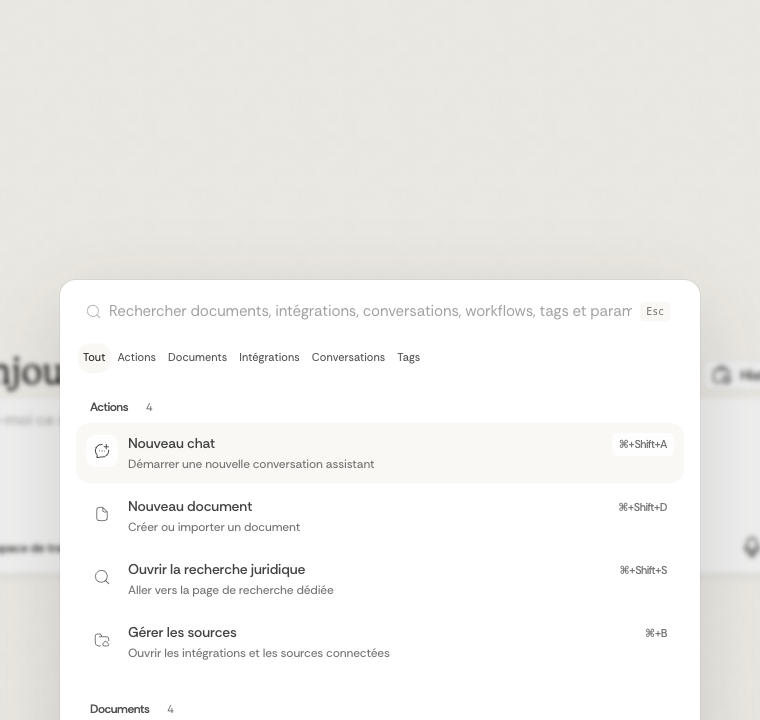
Search everything from one place
You can now search across your whole workspace in a single quick step.
- Open it anytime with Cmd + K or Ctrl + K.
- It also opens straight from the Dynamic Island.
- From there you can find actions, documents, integrations, conversations, workflows, tags, and legal results, all together.
Workflows for notaries
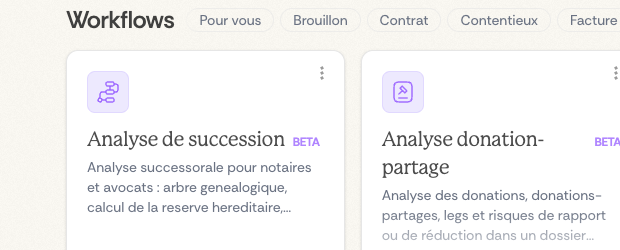
We've added new workflows, still in beta, built for notarial work.
- Sale-file review: cross-check a real-estate sale dossier against its supporting documents.
- Succession analysis: lay out the heirs, unions, donations, and the spouse's rights from a succession file.
- Donation-partage analysis: lay out the people, donations, and patrimonial items from a succession or family file.
Clearer answers and source previews
We've also improved how some results appear when you ask the assistant:
- source previews show more detail
- when several files are read together, they're easier to review
- Mermaid diagrams appear right in the conversation when an answer includes one
Dictaphone and voice input
Recording your voice
The dictaphone turns what you say into text, right where you're typing:
- Up to five minutes per recording, enough for in-depth analyses.
- A live waveform while you speak, so you can see it's working.
- Your words become text right away, with support for several languages.
- Use it anywhere you'd normally type in Ordalie.
Simple to use

- A microphone is there wherever you type.
- A moving waveform shows while you record.
- Stop with a single click to end the recording and get your transcription.
- It transcribes in the background, so you keep working without interruption.
It's especially handy for:
- dictating detailed questions to the assistant
- jotting quick notes during meetings
- putting together detailed search requests
- adding spoken comments to your analyses
Working together on documents
Ordalie integrates a complete document collaboration system: contextual comments with threaded discussions, change tracking (Track Changes) with automatic author attribution, and real-time collaborative editing. For a detailed presentation of these features, see the Documents section.
Dernière mise à jour le
22 juillet 2026