
Manage Your Account
Plans and pricing
Ordalie offers three plans to fit the way you work, from a solo legal professional to a full organization.
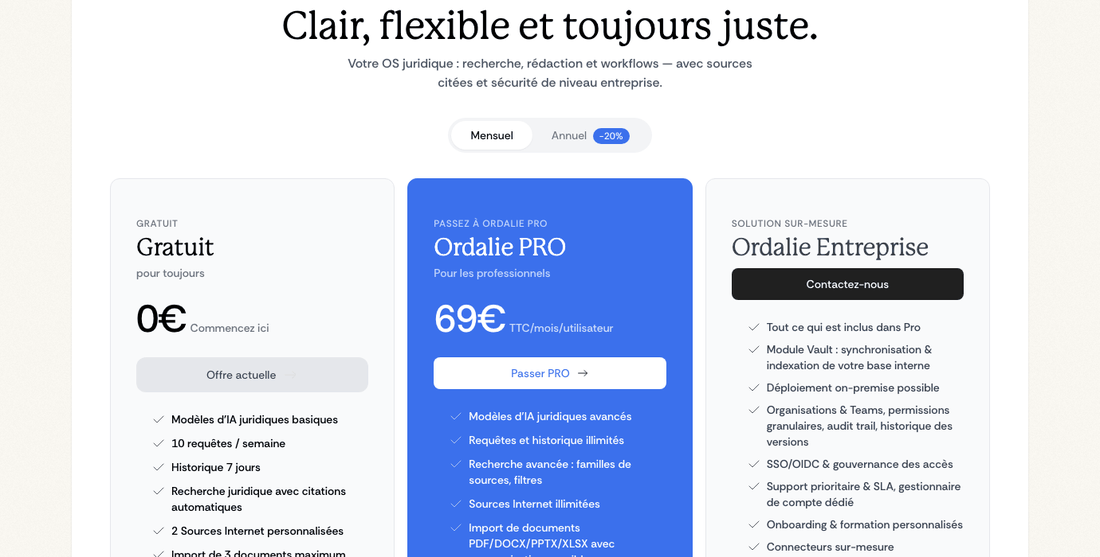
Free plan
The free plan lets you get to know Ordalie, with no commitment:
✨ What's included:
- 10 queries a week: try Ordalie's search and analysis at no cost
- 7-day history: find your conversations and documents from the last 7 days
- A first taste: ask the occasional question and try Ordalie within the weekly free limit. Advanced legal search, workflows, the legal editor, exports, quick notes and the dictaphone come with the paid plans.
- A few document imports: try working from your documents on a small scale. Unlimited imports, advanced editing and PDF/DOCX exports come with PRO or Ordalie MAX.
Ideal for: getting to know Ordalie, trying legal AI on the odd question, or occasional use.
PRO plan
PRO opens up everything Ordalie can do, for everyday professional work.
🚀 Everything advanced:
- PRO quota: built for regular professional use, with around 300 requests a week per user and safeguards against abusive automated use.
- Unlimited history: keep every conversation and analysis, with no time limit
- Advanced search: powerful semantic search with filters you can tailor
- Unlimited imports: bring in and analyze all your documents (PDF, DOCX, PPTX, XLSX)
- Contract drafting: create tailored contracts, deeds and letters with AI
- In-depth legal analysis: guided workflows (hearing preparation, corporate diagrams, and more)
- Integrations: connect your tools (Outlook, Gmail, OneDrive, Google Drive, SharePoint, and more) to bring your documents together
- Advanced editor: legal building blocks (articles, parties, signatures)
- Collaboration: share documents and work as a team
- Flexible export: save your documents as PDF or DOCX
Ideal for: lawyers, in-house counsel, notaries and legal professionals who use Ordalie regularly and intensively.
Ordalie MAX — on request
Ordalie MAX is built for firms, legal departments, notarial offices and organizations with advanced needs: large-scale deployment, central governance, organization-wide integrations, configured workflows and dedicated support.
🏢 Everything in PRO, plus:
- Ordalie Vault: connect your internal servers (SharePoint, FTP, Google Drive) to make your full document base searchable
- On-premise deployment: host Ordalie in your own infrastructure for full control of your data
- Tailored AI: models tuned to your legal field and terminology
- Organizations & teams: structure your firm with teams and fine-grained permissions (Member/Admin)
- Volume pricing: better rates as your number of seats grows
- Dedicated account manager: a single contact to support you
- Tailored training: onboarding and training sessions made for your teams
- Priority support: dedicated technical help with guaranteed SLAs
- Single Sign-On (SSO): connect with your enterprise identity providers (Google Workspace, Azure AD)
Ideal for: law firms, legal departments, notarial offices and organizations that need a complete, tailored legal AI.
Ordalie MAX comes with a quote shaped around your number of users, deployment needs, integrations and support.
Your profile
You'll find your profile from the menu at the top right of your workspace. It's your own space to set up Ordalie and keep your account secure.
Your professional identity
Your profile is the first thing colleagues see when you work together on documents or conversations. Add a professional photo (JPG or PNG, up to 5MB) so your team recognizes you at a glance. Your display name shows up everywhere you take part, so pick something clear and professional.
Add a short description or bio to introduce your role and area of expertise. It's especially handy in larger organizations, where not everyone knows each other. It helps colleagues quickly grasp your legal specialty.
💡 Good to know: Your email address is your account’s unique identifier and cannot be changed after registration. If you need to change your email, contact our support at [email protected].
Keeping your account safe
Protecting your legal data matters. Ordalie gives you several ways to guard your account against unauthorized access.
Two-factor authentication (2FA) is the strongest protection you can turn on. Once set up with an app like Google Authenticator or Authy, every login asks for your password plus a temporary code from your phone. Even if someone learns your password, they can't get in without your phone in hand.
🔒 Our advice: turn on 2FA, especially if you handle confidential cases or your account reaches sensitive documents. It takes under two minutes and greatly strengthens your data security.
Your preferences
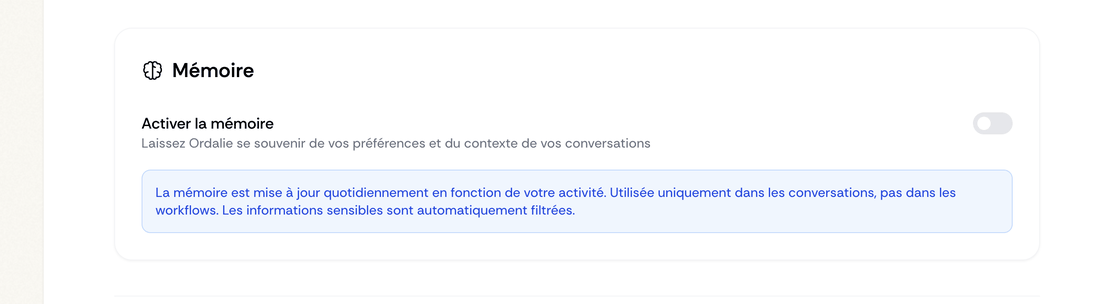
User memory: Ordalie learns from your corrections. It remembers your writing preferences and recurring choices, adapting over time to your style and specific needs.
To enable it, go to your settings:
Ordalie fits the way you work. Switch the language between French and English to suit you or your international clients. Choose a light theme for daytime, a dark theme for long evening sessions, or let it follow your device automatically.
Analytics cookie preferences let you control what we collect to improve your experience. Accept all cookies to help us refine the platform, or keep only the ones essential to running Ordalie.
Choosing your workspace
Depending on your account and organization, Ordalie may offer both the classic experience and the new unified workspace. Your workspace brings the assistant, documents, projects, workflows and connected sources together in one place.
- When you start out, you may be invited to try your unified workspace and follow a short guided tour.
- Your choice is remembered for next time, whenever switching is allowed.
- An organization can set a default or limit switching, depending on its deployment.
Connect your tools
With PRO, you can connect Ordalie to the tools you use every day. Link your mailboxes (Outlook, Gmail), your cloud storage (OneDrive, Google Drive, Dropbox, Nextcloud) or your business tools (SharePoint, Tomorro, Eudonet). Once connected, all your professional content is right there, without leaving Ordalie.
To set up a connection, see the integrations pages of this documentation.
Organizations and teamwork
Set up your organization
An organization in Ordalie stands for your firm, legal department or company. It lets your team work together while keeping data and access cleanly separated.
An organization is the main home for everyone in your structure. It creates a shared space where documents and conversations move between colleagues, with billing centralized for all members. You can shape its look by adding your logo and primary colors, so it reflects your structure's identity.
Organize into teams
Within your organization, create teams to split your structure into separate working groups. Picture a law firm with a “Business Law” team, a “Litigation” team and an “Employment Law” team: each has its own shared documents (visible only to its members), its own conversations and its own permissions.
This makes it easy to collaborate on specific cases while keeping confidentiality between practice areas. A lawyer in Business won't see sensitive Litigation cases unless they're explicitly added to that team.
Permissions, made simple
Ordalie keeps permissions to two levels: simple, but powerful.
Members are the heart of your organization. They create, edit and share documents, join conversations and use all of Ordalie's analysis tools. This is the standard level for your active colleagues, who work freely on every document and shared file within their organization or teams.
Admins have everything members do, plus the controls that keep the organization running: managing members, creating and configuring teams, handling billing and subscriptions, and changing global settings. This role is for partners or the people leading the structure.
📋 Flexible: you can grant these permissions across the whole organization, or more precisely team by team. Someone can be a plain member of the wider organization yet an admin of a specific team.
Invite and manage your team
Managing your organization is straightforward. Send email invitations with the access level you want (Member or Admin), and Ordalie handles the rest. Create new teams, assign members and set permissions as your needs change.
Centralized billing keeps administration simple: add or remove seats in a few clicks, view your invoices and adjust your subscription in one place. No more juggling between systems or contacting support for every small change.
Sign in with Single Sign-On (SSO)
For Ordalie MAX organizations, Ordalie supports Single Sign-On through standard identity providers like Google Workspace, Microsoft Azure AD, or any other standard provider. Your colleagues sign in with their usual enterprise credentials, so there's no extra password to manage.
This centralization strengthens your security: revoke Ordalie access from your enterprise authentication system in one move, without touching each tool by hand. It's especially valuable when someone leaves and you need to cut every access quickly.
🔐 SSO Configuration: SSO setup is done in collaboration with our technical team to guarantee frictionless integration with your existing infrastructure. Contact us at [email protected] to start the process.
Subscriptions and billing
Secure payments with Stripe
Ordalie uses Stripe to handle every part of your subscription, securely and clearly. You reach your customer portal from your profile, under subscription and billing. From there, you're fully in control of your subscription.
Browse your full invoice history and download them as PDF for your accounting. Update your payment details or billing information in a few clicks. It all happens right here, with no need to contact support.
💳 Stripe security: your payment details are handled solely by Stripe, a global leader in online payments. Ordalie never has direct access to your banking data.
Change your subscription anytime
Your subscription grows with you. Move up to PRO to unlock every advanced capability right away, or switch between monthly and annual billing as you prefer. For organizations, add or remove seats as your team grows.
You can cancel at any time, with no fees or penalties. Your access stays open until the end of the period you've already paid for, giving you time to export your data if you need to.
Billing for organizations
In an organization, only admins handle billing. This keeps your structure's sensitive financial details protected. Set a dedicated email to receive invoices (usually your accounting team), and use a Stripe portal built for organizations that brings together payment information for all your seats.
📊 One consolidated invoice: a single bill for your whole organization, whatever the number of members. Simpler accounting, simpler administration.
Advanced organization controls
Depending on the deployment, organization admins may get advanced controls: a workflow catalog where workflows can be hidden or pinned, an organization usage report, default sources and jurisdictions for new members, turning on the Ledger in navigation, SSO/OIDC settings and organization-wide integrations.
Billing can also sit with the organization. When an organization subscription covers someone who already pays personally, Ordalie keeps the organization as its own billing entity and can schedule the redundant personal subscription to end at the close of the already-paid period, so seats are managed centrally without moving personal billing details into the organization.
How the assistant works with you
From your profile settings, you can choose how often the assistant asks clarifying questions: minimal, occasional, regular or systematic. The memory setting lets Ordalie build a user memory from your activity, usually each day, so conversations can reuse stable context. Memory applies to conversations, not workflows, and sensitive information is filtered out automatically where possible.
Active sessions
Your settings also show your active sessions. For security, a session can expire on its own after a long stretch, and Ordalie limits how many can be open at once. If you don't recognize one, sign it out and sign back in.
Change your email or delete your account
From your profile settings, you can request an email address change and confirm it with the code sent by email. If two-factor authentication is enabled, Ordalie asks for that code before starting the change.
You can also request account deletion from settings. The deletion flow explains what will be removed, asks for confirmation by email code, and blocks deletion when the account is still the last admin of an organization until that responsibility is transferred.