Projects
A project gathers everything for one matter in your workspace, even when the pieces live in different places.
In legal work, a matter rarely sits in one folder. There are internal documents, email attachments, files in SharePoint or OneDrive, conversations with the assistant, and sometimes several rounds of analysis. A project brings these pieces together without moving them.
Think of it as a layer of organization above your sources. Your files stay where they are. Ordalie simply keeps a reference to them, so you can come back to the whole matter faster.
When to use a project
Create a project when you are working on a matter, transaction, audit, client, or topic that will last beyond a single search. It becomes your natural place to return to: the relevant material, the useful conversations, and the connected sources are all there.
Avoid projects that are too broad, like “Contracts” or “Tax”. For those, a search, a filter, or a favorite usually works better. A good project has a clear scope: “Martin matter”, “Supplier audit 2026”, “ACME dispute”, “Cross-border acquisition”.
Start a project
- Choose New matter and give it a specific name, such as “Supplier audit 2026”.
- Check its visibility: a project is private by default; available sharing options depend on your organisation.
- Open the project and use Import to add the documents you need.
- Use Chat to start a conversation with the project as context.
What a project can hold
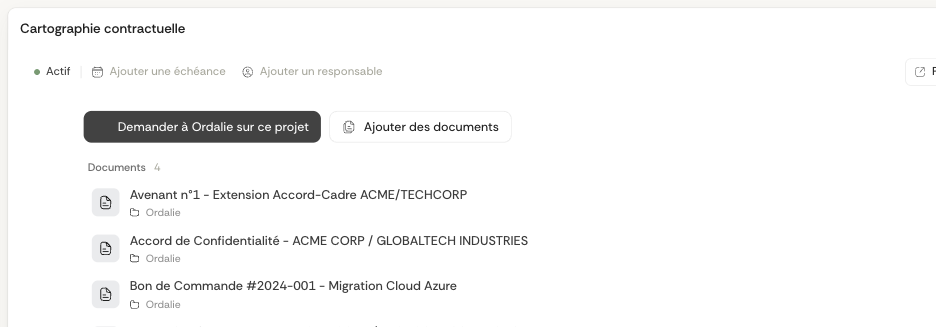
A project can mix several kinds of items: Ordalie documents, conversations with the assistant, analyses, external files, and connected folders. That is the whole point: it isn’t tied to a single source.
The same project can hold a contract imported into Ordalie, a SharePoint folder, a conversation where the assistant wrote a summary, and a OneDrive file a client sent you. The project copies nothing; it gives everyone a shared working view.
To remove an item, use its remove-from-project action. This removes the reference from the project without deleting the original document or file. To act on several project items, select them in the list, extend the selection with Shift if needed, then use the bulk action bar. Removing them only detaches their references from the project; it does not delete the original documents, conversations, or connected files. Conversation menus also offer Copy link and, when your permissions allow, Share.
Permissions and sharing
Sharing a project lets several people in your organization work from the same matter. When you share a project, invitees get read-only access to the Ordalie documents and conversations already in it, and to items added later. If they need to edit or comment on an item, give them a direct permission on that item.
Connected-source items still follow the permission rules of their original provider. The project share dialog shows what will be exposed before you invite people, and items that are readable only through the project are marked as “via project · read-only”.
With the assistant
Projects are especially handy when you work with the assistant. Instead of attaching every piece by hand, you can start from a project you’ve already built and grow your working context from there.
This works well for matter analysis, contract comparison, document audits, and multi-document workflows. The tidier the project, the more coherent the context the assistant works from.
Migration from tags
Older tags that aren’t favorites are gradually turned into personal projects. When several tags share the same name, they are merged to avoid duplicates.
This migration deletes no documents and changes no permissions. It simply turns the old way of classifying into one better suited to matters that span several sources.
Practical summary
The quick difference with a folder
A folder is a location inside one source. A project is an Ordalie view that can reference items from several sources. So one project can include a SharePoint folder, an Ordalie document, and a conversation with the assistant.
Keep active projects close
The sidebar shows pinned projects and your first active projects. Open All projects to switch between active and archived work, change the sort order, or select several projects to archive or restore together. Ordalie also suggests archiving a project after 90 days without activity.
To file documents without interrupting your work, drag one or several workspace documents onto a project in the sidebar. This links them to the project without creating another copy. Documents created from a project conversation are linked to that project automatically.