Ledger
The Ledger pulls the key facts out of your contracts into one clear, sourced view. It is built for reviewing contracts, the parties involved, clauses and citations, without ever losing the link back to the original document.
What the Ledger shows
The Ledger arranges what it finds around your contracts: the parties, the clauses, the details and the citations behind them. Instead of just listing files, it shows you the legal facts and the evidence for each one. When a citation is available, you can jump straight from a clause or a party to the exact passage in the source document.
Overview dashboard
The overview groups portfolio signals into cards you can scan quickly: renewal queues, relationships, governing law, source coverage and repeated clause language. You can personalise the dashboard by reordering the cards that matter most to your review.
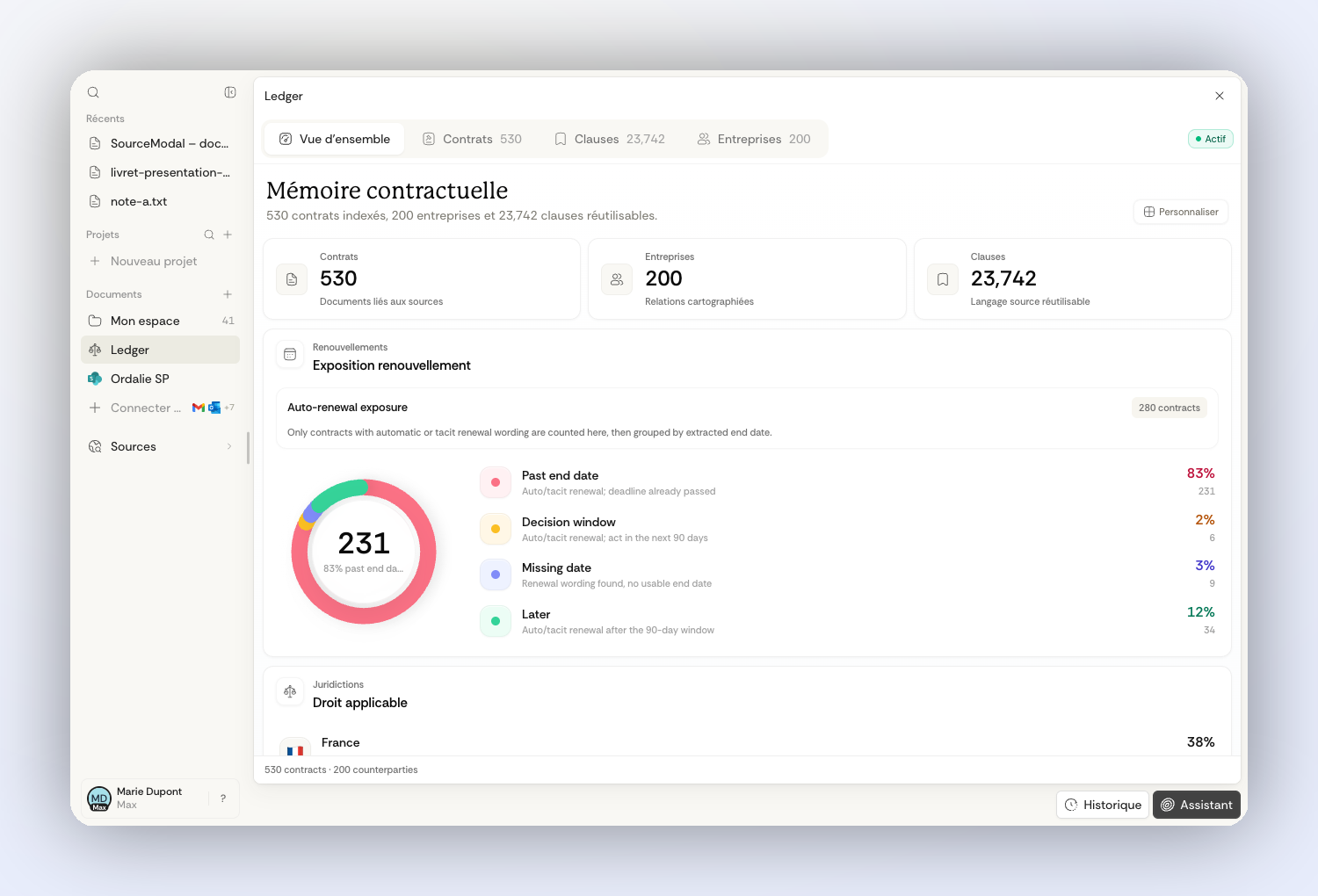
Renewal exposure separates contracts that are already past their end date, those approaching a decision window, contracts with a missing date and later renewals. Use the company and clause views to move from that signal to the counterparties and language that require attention.
When to use it
Reach for the Ledger when your team needs to read a whole set of contracts or case documents at once: due diligence, portfolio review, supplier contract analysis, lease review, or ongoing contract monitoring. For a single question, the assistant is often quicker; for a structured set of documents, the Ledger gives you a steadier place to read.
Filters
The Ledger lets you filter by parties, families of clauses, contracts and source details. Depending on your set of documents and how your organization is set up, some filters may be missing or incomplete. They are there to help you review, not to replace checking the cited source yourself.
Searching and narrowing the scope
In the contracts view, use the scope bar to combine search with filters such as counterparty, governing law, document type, clause family, signature status or expiry. The live count shows how many contracts are in scope before you open the detail panel or ask a question from that narrowed set.
The search palette gives you a faster way to jump across contracts, clauses, counterparties and source documents. It is useful when you know part of a name, a clause family, or a queue you want to inspect.
Turning it on and finding it
The Ledger is controlled by your organization. Administrators can turn it on and decide where it appears in your workspace. In some organizations it sits alongside the Library for legal research, or takes its place. If it opens empty, it may not be turned on for your organization yet, or there may be no set of documents ready to read.
How it fits with your documents and projects
Your documents and connected sources are where your files live. A project gathers everything around one case. The Ledger reads across that material and lays out the legal facts it finds inside it. The three work well together: a project holds the relevant material, while the Ledger gives you a structured way to review it.