
Recent and Beta Features
This section covers recently added features or features still in beta.
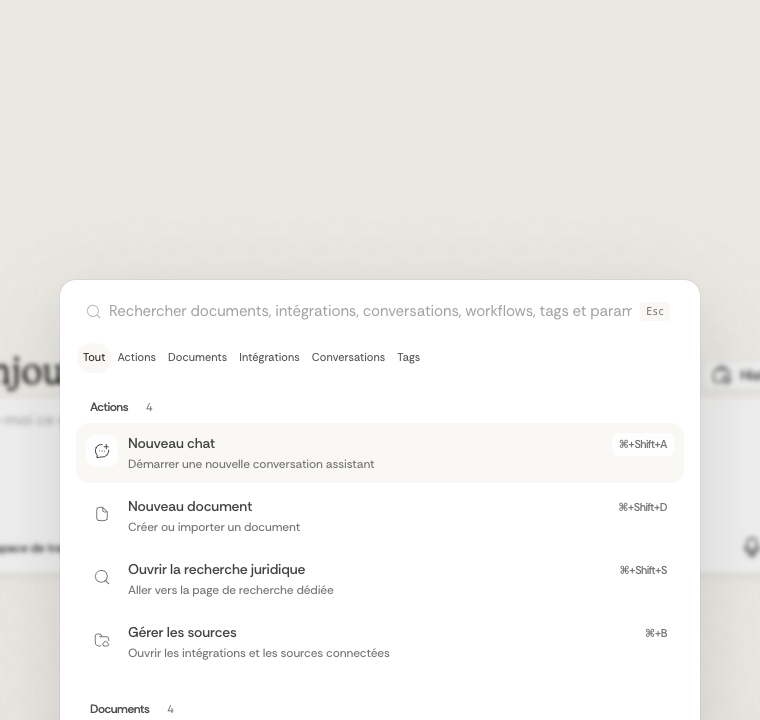
Global Search Palette
The app now includes a global search palette.
- Open it with Cmd + K or Ctrl + K
- The same palette can also be opened from the Dynamic Island
- It can search actions, documents, integrations, conversations, workflows, tags, and legal results from one place
Notary Workflows
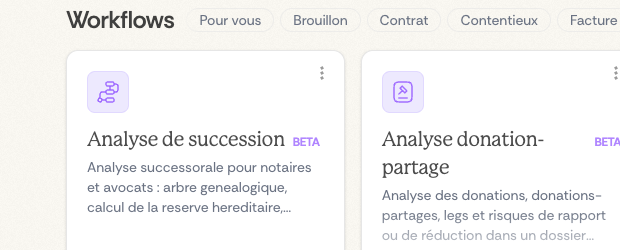
New beta workflows have been added for notarial use cases.
- Sale-file review: a workflow for cross-checking a real-estate sale dossier against the supporting documents
- Succession analysis: a workflow for structuring heirs, unions, donations, and spouse rights from a succession file
- Donation-partage analysis: a workflow for structuring people, donations, and patrimonial elements from a succession or family file
Source Preview and Chat Rendering
Recent updates also changed how some results are displayed in chat:
- source previews are more detailed
- grouped file reads are easier to review
- Mermaid diagrams can be rendered directly in the conversation when the answer contains one
Dictaphone and Voice Input
Advanced Voice Recording
The dictaphone converts speech to text directly in input fields:
- Recording Limit: Recordings up to 5 minutes for in-depth analyses
- Real-Time Visualization: Dynamic waveform during recording for visual feedback
- Automatic Conversion: Immediate speech-to-text transformation with multilingual support
- Contextual Integration: Direct use in all Ordalie input areas
Intuitive Interface

- Microphone Button: Accessible in all main input fields
- Visual Feedback: Waveform animation during recording
- Simple Stop: Single click to end recording and get transcription
- Background Processing: Automatic conversion without workflow interruption
This feature is particularly useful for:
- Dictating complex questions to the AI assistant
- Taking quick notes during meetings
- Formulating detailed search queries
- Enriching your analyses with voice comments
Collaboration and Change Tracking
Ordalie integrates a complete document collaboration system: contextual comments with threaded discussions, change tracking (Track Changes) with automatic author attribution, and real-time collaborative editing. For a detailed presentation of these features, see the Documents section.
Dernière mise à jour le
17 mars 2026