
Integrations
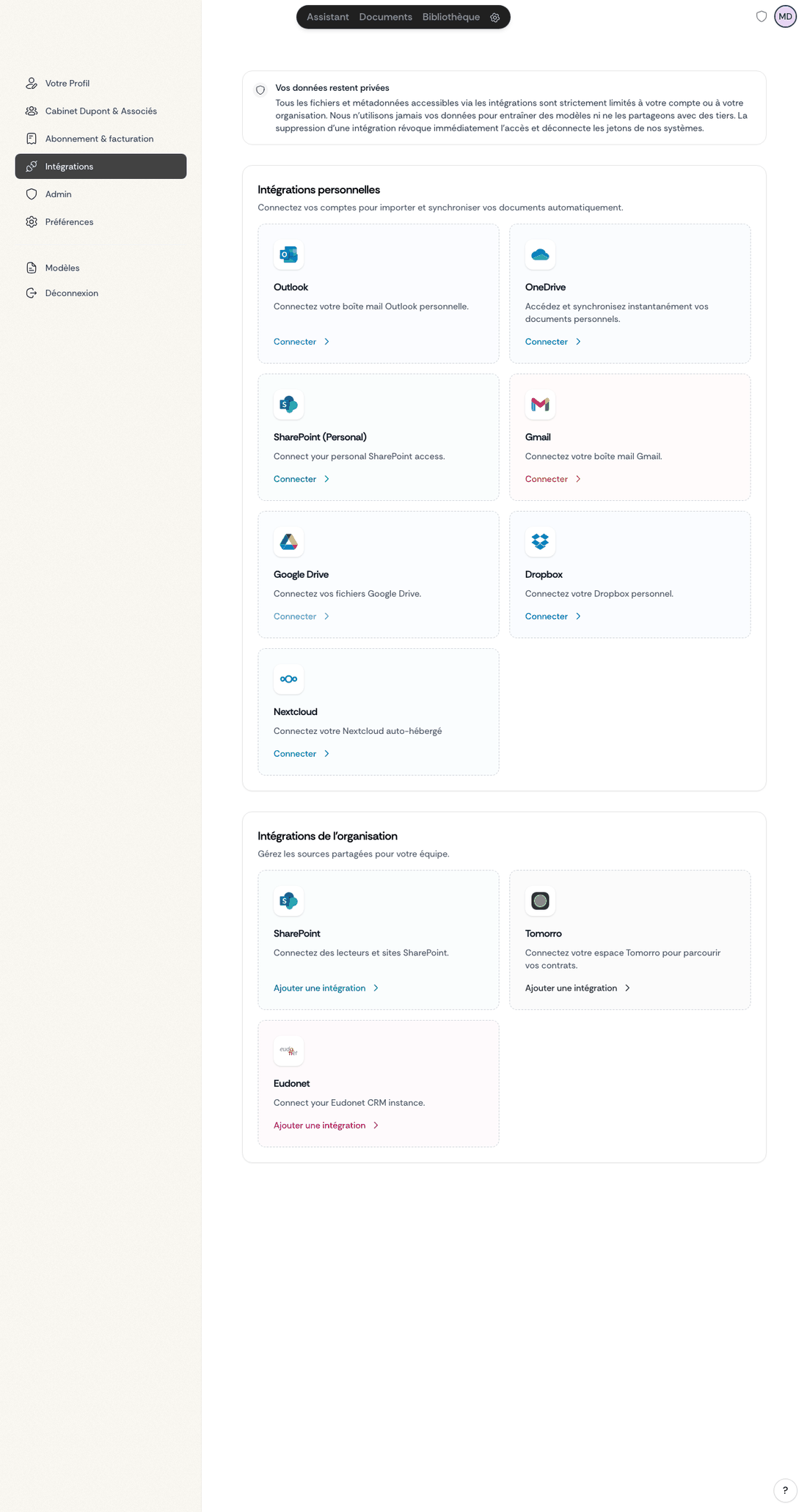
Ordalie can connect to your daily work tools to centralize access to your professional documents while benefiting from legal artificial intelligence. These integrations allow you to search and analyze your external content directly from Ordalie, without having to duplicate it.
Outlook (Personal Integration)
Connect your personal Outlook mailbox to access your emails and attachments directly from Ordalie. This integration allows you to:
- Search through your emails with the AI assistant
- Mention specific emails with the @ system in your conversations
- Analyze attachments without having to download them manually
Configuration: From Settings > Integrations, click "Connect" next to Outlook. You will be redirected to the Microsoft authentication page to authorize read access to your mailbox.
Gmail (Personal Integration)
Connect your Gmail mailbox to access your emails and attachments from Ordalie. The functionality is identical to the Outlook integration.
Configuration: From Settings > Integrations, click "Connect" next to Gmail. You will be redirected to the Google authentication page to authorize access.
Cloud Storage
OneDrive (Personal Integration)
Connect your personal OneDrive space to browse your folders and access your files directly from Ordalie.
Google Drive (Personal Integration)
Connect your Google Drive to import and view your documents without leaving Ordalie. Supports Google-native formats (Docs, Sheets, Slides) with automatic conversion.
Detailed Google Drive setup guide
Dropbox (Personal Integration)
Connect your Dropbox to access your cloud-stored files, with optional write access for uploading documents.
Box (Personal Integration)
Connect your Box account to access your cloud files, with optional write access for uploading documents and creating folders.
Nextcloud (Personal Integration)
For users of a Nextcloud server (self-hosted or hosted), connect your instance to access your documents via WebDAV.
Configuration: The Nextcloud connection requires your server URL and credentials.
Detailed Nextcloud setup guide
All cloud storage integrations are configured from Settings > Integrations. Once connected, your files are accessible via the @ system and in workflows.
Organization Integrations
The integrations below are configured at the organization level by an administrator and shared with all authorized members.
SharePoint
Access your Microsoft SharePoint enterprise document libraries. Supports both organization-level (app credentials) and personal (delegated OAuth) connection modes.
Detailed SharePoint setup guide — covers both organization and personal modes, Azure AD configuration, certificate authentication, and multi-drive setup.
Tomorro
If your organization uses Tomorro for contract management, connect your workspace to access your contracts directly from Ordalie.
Configuration: Provide a Tomorro API key from Settings > Integrations.
Eudonet
For organizations using the Eudonet CRM, this integration allows access to your dossiers and documents from Ordalie.
Configuration: Provide your Eudonet credentials from Settings > Integrations.
Odoo (Documents)
For organizations using the Odoo Documents module, this integration lets you browse, search, and analyze your Odoo documents from Ordalie. Writing (uploading documents, creating folders) is possible if the mount is configured with write access.
Configuration: Provide your Odoo instance URL and an API key from Settings > Integrations.
Synchronization and Indexing
When an integration is configured, Ordalie progressively indexes your documents to make them searchable. A progress indicator shows you the status of this initial indexing. Once completed, your external files become usable with all Ordalie functionalities: search, AI analysis, workflows, and @ mention system.
Changes in your external platforms are automatically detected, and the index is updated accordingly to reflect the latest changes.
Using Integrated Documents
Once your integrations are configured, you can use your external content exactly like your documents imported into Ordalie:
- Search: Integrated documents appear in search results
- @ Mention: Type @ in any conversation to access your external content
- AI Analysis: The assistant can analyze these documents like any other file
- Workflows: You can use your external documents in analysis or generation workflows
Documents remain physically hosted on your original platform — Ordalie accesses them on demand, ensuring that your organization maintains total control of its data.
Workspaces
Workspaces turn a conversation into a folder-anchored work session (local or remote), instead of a sequence of isolated attachments.
What changes in practice
- Durable context: the conversation stays tied to one folder for the whole session.
- Direct navigation: browse the active folder from chat without switching screens.
- Split view workflow: open a document in the side panel and keep chatting in parallel.
- Document continuity: generated/edited files remain in that same workspace context.
Where it works
You can start a conversation from:
- your Documents space (default workspace),
- a tag folder,
- a remote integration folder (OneDrive, SharePoint, Dropbox, etc.).
The model is intentionally unified: a workspace is always handled as an active folder.
Recommended workflow
- Choose the folder when starting the conversation (workspace button in chat).
- Ask your question without re-attaching the same files on every message.
- Open a document from the workspace panel for live reading/editing.
- Run AI generation or edits: created/updated files stay in the current workspace.
Why this is useful in production
- Data room review, due diligence, multi-document contract analysis.
- Work directly in team folders already structured in your storage tools.
- Fewer context switches and less context loss.
Writing to remote storage
When connector capabilities and permissions allow it, documents produced by Ordalie are saved directly to the active workspace storage. In practice, this lets you work in place on remote repositories, instead of copying files into an intermediate area.
Read and Write Behavior
Workspace behavior depends on the access level of the connected source.
- In a read-only workspace, you can browse, search, preview, and use files in chat or workflows.
- In a read-write workspace, Ordalie can also save generated documents back into the active folder and create new files or folders when the connector supports it.
This applies to remote folders opened from integrations as well as workspace-based work inside the product.
Security and Confidentiality
Ordalie's integrations respect strict security standards:
- Secure Protocols: All connections to third-party platforms use OAuth 2.0 and HTTPS
- Minimal Permissions: Ordalie only requests necessary read access
- Revocable Tokens: You can disconnect an integration at any time from your settings
- No Copying: External files are not duplicated on Ordalie's servers, they are accessed on demand
- Access Separation: Personal integrations remain private, while organization integrations are accessible to all authorized members
Availability: Integrations are available for all PRO users. For Enterprise accounts, additional custom integrations can be developed according to your specific needs. For a complete integration solution with bidirectional synchronization, discover Ordalie Vault.